
Appearance
Plugins
AgeVerif Plugins integrate the AgeVerif Checker Script, a tiny 5 kB client-side JavaScript script embedded into your website. When a visitor arrives, depending on your configured settings, a fullscreen age-verification modal is displayed and all page content is blurred. Access is only granted once the visitor confirms their age.
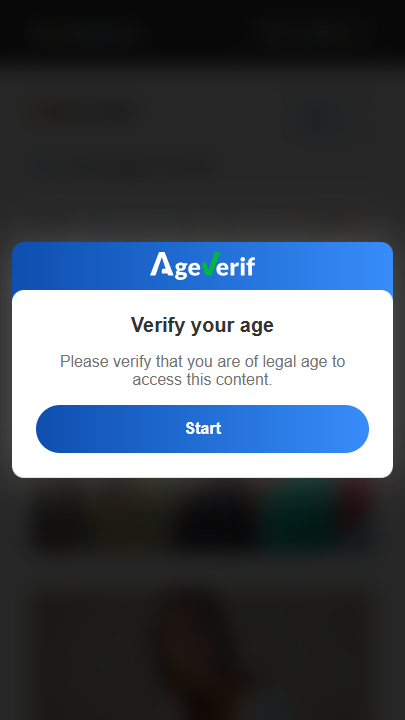
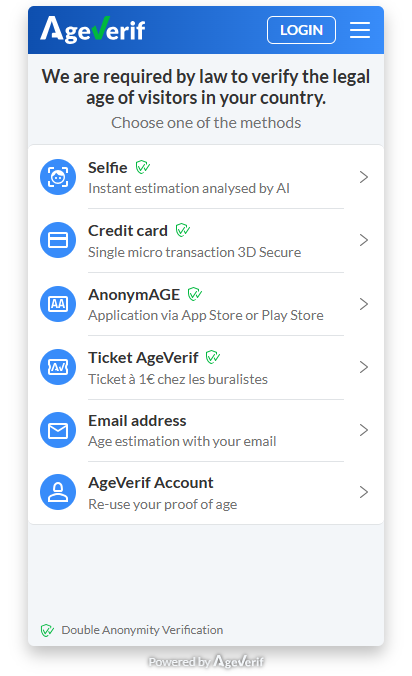
The logo and colors can be customized in the Webmasters Platform to match your website's design.
⏳ Session Duration
The visitor is verified for a certain period of time depending on the jurisdiction. Check the Compliance and Policies page for more information.
Requirements
- Register on our Webmasters Platform as a webmaster at https://webmasters.ageverif.com.
- Register your website domain at https://webmasters.ageverif.com/website/add.
WordPress / WooCommerce
The AgeVerif WordPress plugin works with any WordPress site, including WooCommerce stores. No code editing required.
Integration
- Add a new plugin to your WordPress site or download the plugin from the official WordPress Plugin Directory (https://wordpress.org/plugins/ageverif/).
- In your WordPress Admin area, activate the newly installed plugin by clicking Activate.
- Navigate to AgeVerif Plugin, start by reading Getting Started page to confirm you've completed all the initial requirements.
- If you've checklisted all the initial requirements, please move to Plugin Settings
- Start by pasting your Website Public Live Key (copied from the Webmasters Platform) into the corresponding field.
- Set your preferred Trigger Mode and Visitor Mode
You can test the age verification flow by checking Admins Only in the Visitor Mode and visiting your website in a private/incognito browser window.
- Once you're done, please Save Changes.
- Your plugin is now configured and ready to use ✅
⏳ Note
You can enable/disable the plugin at any time by changing the AgeVerif Status setting in the plugin settings area.
Plugin Glossary
AgeVerif Status
Enables or disables the AgeVerif Checker on your website. When disabled, the Checker Script is not loaded and no age verification modal is shown to visitors.
| Value | Description |
|---|---|
| Enabled | AgeVerif is active and will prompt visitors to verify their age, according to the configured settings. |
| Disabled (default) | AgeVerif is inactive. No age verification procedure is executed. |
Website Public Live Key
Your site's unique identifier, used to link the plugin to your AgeVerif account. This key is generated per domain in the Webmasters Platform.
IMPORTANT
Use your Live Key for production. A separate Test Key is available but should not be used on a live website.
Where To Trigger Verification
Controls which pages on your site load the age verification Checker.
| Option | Description |
|---|---|
| All pages (default) | The Checker loads on every page of your website. |
| Only matching URLs | The Checker loads only on URLs matching the patterns defined in the URL Patterns field. |
| All pages except matching URLs | The Checker loads everywhere except on URLs matching the patterns in the URL Patterns field. |
URL Patterns
A list of URL path patterns used in combination with the Where To Trigger Verification setting. Enter one pattern per line.
Example patterns:
/categories/*
/videos/
IMPORTANT
This field is only applied when the trigger mode is set to Only matching URLs or All pages except matching URLs. It has no effect when All pages is selected.
Visitor Mode
Determines which visitors see the age verification modal.
| Option | Description |
|---|---|
| All Visitors (default) | Every visitor sees the Checker, including logged-in WordPress Admins. |
| All Except Admins | The Checker is shown to everyone except logged-in WordPress Admins. |
| Admins Only | The Checker is shown only to logged-in WordPress Admins. Recommended for testing before going live. |
Shopify
The AgeVerif Shopify app works with any Shopify store. It is installed as a Theme App Extension — no code editing is required and it does not modify your theme files.
Integration
- Install the AgeVerif app from the Shopify App Store.
- Open the app in your Shopify Admin. Read the Setup guide to confirm you've completed all the initial requirements.
- Navigate to the Settings page of the app.
- Paste your AgeVerif API Key (copied from the Webmasters Platform) into the corresponding field.
- Click Enable, then Save.
- Activate the App Embed in your theme:
- Go to Online Store → Themes → Customize.
- Click the App embeds icon in the left sidebar.
- Toggle AgeVerif Checker ON.
- Click Save.
IMPORTANT
The App Embed step (step 6) must be completed manually — Shopify does not allow apps to enable their own embed block. Without it, the checker script will not load on the storefront.
TIP
You can verify the integration is working by checking the status badge at the top of the settings page. It should show Active once the API key is valid and the checker is enabled.
Plugin Glossary
AgeVerif API Key
Your site's unique identifier, used to link the app to your AgeVerif account. This key is generated per domain in the Webmasters Platform.
IMPORTANT
Use your Live Key for production. A separate Test Key is available for testing, but should not be used on a live store.
Enable / Disable
The Enable / Disable button activates or deactivates the AgeVerif Checker on your storefront.
| State | Description |
|---|---|
| Active | A valid API key is set and the checker is enabled. Age verification is live on the storefront. |
| No valid API key | The checker is enabled, but the API key is missing or was not recognised. |
| Disabled (default) | The checker is inactive. No age verification is executed. |
Trigger Mode
Controls how the age verification flow is initiated when a visitor lands on your store.
| Option | Description |
|---|---|
| Automatic (default) | The checker runs as soon as the page loads. |
| Button | A Verify Age button is shown; the checker only runs when the visitor clicks it. |
TIP
When using Button mode, you can attach the trigger to any existing theme element by adding the data-ageverif-trigger attribute to it. If no element is tagged, a default floating button is injected automatically.
Page Targeting
Controls which pages on your storefront run the age check.
Page Scope
| Option | Description |
|---|---|
| All pages (default) | The checker runs on every page of your store. |
| Specific page types | The checker runs only on the selected page types (see below). |
Page Types
Available when Specific page types is selected. You can enable the checker for any combination of the following:
| Page Type | Description |
|---|---|
| Home | The store's home page. |
| Products | Individual product pages. |
| Collections | Collection listing pages. |
| Blog posts | Blog article pages. |
| Custom pages | Static pages created in Shopify Admin. |
| Cart | The cart page. |
| Search | The search results page. |
Include URL Patterns
An optional list of URL path patterns. Pages matching these patterns will also run the age check, in addition to any selected page types. Enter one pattern per line. Use * as a wildcard.
Example patterns:
/collections/adults*
/products/special-item
Exclude URL Patterns
An optional list of URL path patterns for pages that should never run the age check. Exclusions take priority over all other settings. Enter one pattern per line.
Example patterns:
/cart
/checkout/*
/account/*